Flutter Mobile App Development: A 2026 Production Field Guide
How we structure Flutter projects at GetWidget in 2026: feature-first layout, Riverpod defaults, Dart 3 records and sealed classes, Material 3 theming, the 200-line widget rule, performance diagnosis, CI/CD pipelines, and the production pitfalls that bite teams after launch.
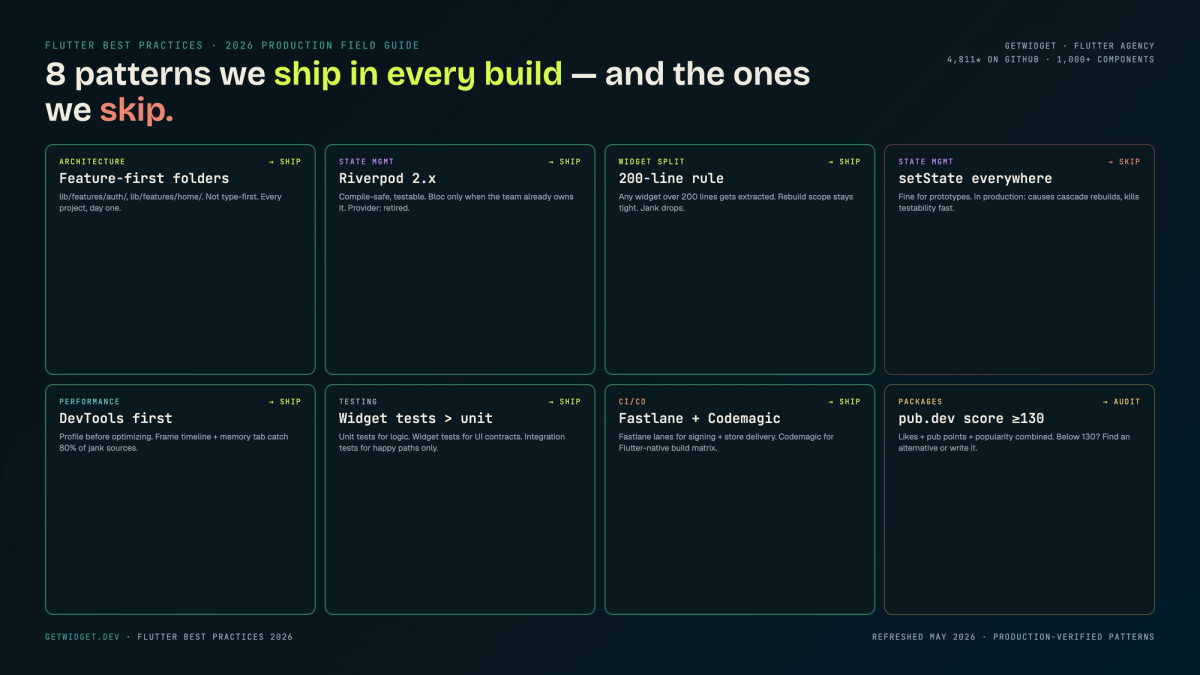
Flutter mobile app development at production scale isn't about which widget to use — it's about the project shape, state defaults, and CI/CD habits that hold up after launch. Our team has shipped Flutter across healthcare, fintech, ecommerce, education, and six other verticals since the framework went stable in December 2018, and this guide documents the patterns we've landed on: folder conventions, state management defaults, performance, testing, and the deployment pipeline that actually catches regressions.
We maintain the open-source GetWidget Flutter UI Kit (4,811 GitHub stars, 23K monthly pub.dev downloads, 1,000+ components in production). That library is a direct output of the flutter best practices we describe here. If you've seen our components in the wild, this is the opinionated layer underneath them.
One caveat up front: no single pattern works for every team size and app complexity. Where we have a hard default, we say so. Where we'd choose differently based on context, we explain the trade-offs.
Project structure we use across all GetWidget builds
Two schools exist: layer-first and feature-first. Layer-first looks like this: /models, /repositories, /services, /screens, /widgets. Feature-first groups everything by domain (/auth, /checkout, /profile), each with its own models, services, widgets, and screens inside.
We default to feature-first for any app with more than three screens. Layer-first reads clean at the start but becomes navigation hell at scale: you're jumping between four directories to touch one feature. Feature-first keeps a developer inside one folder for an entire sprint.
lib/
  core/
    theme/          # AppTheme, color tokens, text styles
    router/         # GoRouter config
    di/             # Dependency injection (get_it / riverpod providers)
    utils/          # Date formatters, validators, extensions
  features/
    auth/
      data/         # AuthRepository, AuthRemoteDataSource
      domain/       # AuthUser model, AuthFailure sealed class
      presentation/ # LoginScreen, RegisterScreen, AuthController
    home/
      data/
      domain/
      presentation/
    checkout/
      data/
      domain/
      presentation/
  shared/
    widgets/        # Reusable components (uses GetWidget UI Kit)
    models/         # Cross-feature value objects
main.dart
main_staging.dart
main_production.dart
Three files at the root (main.dart, main_staging.dart, main_production.dart) map directly to build flavors — more on that in the environment config section. The core/di/ folder is where we wire Riverpod providers or get_it registrations centrally, rather than scattering them through feature folders.
State management: which approach we default to and why
State management is the most-argued topic in Flutter. Our team has shipped apps with Provider, BLoC, and Riverpod. Here's where we've landed.
| Option | Pros | Cons | Verdict |
|---|---|---|---|
| setState | Zero dependencies, instant to understand | Rebuilds whole widget subtree, no separation of concerns | Prototype and isolated UI-only widgets only |
| Provider | Lightweight, good InheritedWidget wrapper, large community | Boilerplate grows on complex state, manual disposal | Good for apps with 1-3 shared state sources |
| Riverpod | Compile-safe providers, auto-dispose, testable without BuildContext, excellent Async support | Learning curve for code-gen pattern, generator adds build step | Our default for mid-to-large apps |
| BLoC / Cubit | Strict separation, event stream tracing, strong enterprise adoption | Verbose for simple state, stream boilerplate | When team already knows RxDart or client mandates it |
In our GetWidget builds we default to Riverpod with code generation. The main reason: providers are compile-time checked, disposal is automatic, and you can test a provider in isolation without pumping a widget tree. On projects where we've migrated from Provider to Riverpod, stale-state bugs after navigation pops drop sharply in the first sprint. The auto-dispose mechanism removes the category of bug entirely rather than requiring manual disposal calls.
One rule we enforce regardless of which library you choose: no business logic inside widgets. Screens call providers or controllers. Controllers hold logic. Widgets render data. Keeping that boundary hard is what makes the codebase testable two years from now.
Dart 3 patterns we use in production: records, sealed classes, pattern matching
Dart 3 shipped records, sealed classes, and pattern matching, and we have rewired three patterns in our flutter mobile app development stack around them. None of these are about being clever; they are about removing categories of bug that used to need defensive code.
Records replace ad-hoc tuple classes for short-lived multi-value returns. A repository method that used to return a custom PaginatedResult class with two fields now returns (items: List<Item>, hasMore: bool). The call site destructures inline: final (:items, :hasMore) = await repo.fetchPage(0). Fewer files, less boilerplate, and the compiler still type-checks every access. We use records for return types that exist only at the function boundary and are never stored in state.
Sealed classes are the bigger win for state. Our Result type is now sealed: Result.success(T data), Result.failure(AppException error). The compiler forces every switch over a Result to handle both branches, so we cannot ship a UI that silently drops the failure case. On the last app we rewired to sealed Result types, error-handling code dropped by roughly a third because the compiler caught missing branches the old approach hid.
Pattern matching pairs with sealed classes: switch (state) { case Success(:final data) => ResultView(data); case Failure(:final error) => ErrorView(error); } is shorter and safer than the if-isA chains we used to write. It is also useful for parsing webhook payloads where you want to branch on shape. We have not found it useful for general UI logic. One trade-off worth surfacing: junior engineers sometimes overuse pattern matching where a plain if would be clearer. Our style guide rule: pattern matching is for exhaustive cases over sealed types, not a flex.
Widget splitting: the 200-line rule and why it matters
A Flutter widget file that grows past 200 lines is a signal, not a hard error. But it almost always means the widget is doing too much. On code review, our team flags any widget that both fetches data AND renders complex UI AND manages local animation state. That's three responsibilities in one class.
Split into a screen (decides what data to fetch), a view (receives data as parameters, has no dependencies), and component widgets (reusable UI atoms). This separation means the view can be tested with pumpWidget() without any mocked providers.
Material 3 theming for flutter mobile app development: ColorScheme.fromSeed and typography defaults
Material 3 became the Flutter default in 3.16 and is mandatory in current versions for any new flutter mobile app development. The migration from Material 2 is mostly invisible if you used the framework defaults, painful if you customized aggressively. Two specifics worth getting right on day one.
ColorScheme.fromSeed is the single most useful API in M3. Pass one brand color and Flutter generates a complete tonal palette (primary, secondary, tertiary, surface, error) that respects M3 contrast ratios in both light and dark modes. Our standard ThemeData call: ThemeData(useMaterial3: true, colorScheme: ColorScheme.fromSeed(seedColor: brand.primary, brightness: Brightness.light)). For dark mode, swap brightness and Flutter handles the inversion. Resist the urge to hand-pick all twelve color roles unless the brand guide forces it.
Typography changed too. M3 uses Display, Headline, Title, Body, Label naming with five sizes each (large, medium, small). If you ship app-wide font weight or size overrides, set them on ThemeData.textTheme once. The old M2 headline1 through subtitle1 names still resolve but are deprecated, and our code review flags any new use. One gotcha that bit us on migration: Card has no shadow by default in M3 because it uses surface tint instead. If your design relies on the elevation drop-shadow look, set Card elevation explicitly and add a CardTheme override globally.
Flutter best practices for performance: what causes jank and how to fix it
Jank in Flutter almost always falls into one of three categories: rebuilding too much, painting too often, or blocking the UI thread. Flutter DevTools' Performance tab shows which frame dropped below 16ms and where the CPU time went. Open it first before guessing.
Our performance checklist for every screen review:
1. const constructors on every leaf widget that does not depend on runtime state. 2. ListView.builder, not ListView with a children: [] for dynamic content. 3. RepaintBoundary around any widget that animates independently (Lottie, shimmer loaders, custom canvas). 4. cached_network_image for every remote image with a disk cache policy set. 5. No synchronous JSON parsing on the main isolate for payloads over 5KB: use compute() or an isolate pool. 6. Avoid Opacity widget with opacity: 0.99; use FadeTransition instead to keep the widget off the raster cache.
On a data-heavy list screen in a healthcare app our team shipped, switching from ListView() to ListView.builder plus RepaintBoundary on card items dropped average frame time from 24ms to 11ms. That was a measurable improvement on a mid-range Android device running the patient record view.
For image-heavy screens we use cached_network_image with a CacheManager configured to store no more than 100 images and expire after 7 days. Unbounded disk caches are a support ticket waiting to happen on low-storage Android devices.
Build flavors and environment config: staging vs production in Flutter
Every production Flutter app needs at least two environments: staging and production. We ship three: dev, staging, production. The cleanest way to handle this in Flutter is separate entry points per environment combined with a dart-define or .env approach for secrets.
import 'bootstrap.dart';
import 'core/config/app_config.dart';

void main() {
  AppConfig.init(
    env: AppEnvironment.staging,
    apiBaseUrl: const String.fromEnvironment('API_BASE_URL'),
    sentryDsn: const String.fromEnvironment('SENTRY_DSN'),
    featureFlags: FeatureFlags.staging(),
  );
  bootstrap();
}
Secrets (API keys, DSNs) come in at build time via --dart-define-from-file=.env.staging, never hardcoded. The AppConfig singleton is initialized in main before runApp() and read from anywhere in the app via AppConfig.instance. This keeps configuration fully testable: inject a mock AppConfig in tests and your repository tests never hit real endpoints.
Testing strategy: what to unit-test, widget-test, and integration-test
Flutter's testing pyramid has three layers. Our internal coverage targets aim for high line coverage on unit tests and at least the main states tested on widget tests, with key user journeys covered by integration tests. Those are targets, not hard floors. A codebase with zero widget tests and high unit coverage usually has business logic tested but no confidence that anything actually renders correctly.
Testing layer breakdown
Unit tests (fast, no Flutter framework)
Test repositories, use cases, state management controllers, utility functions. No pumpWidget(). Run in under 100ms each. In our Riverpod setup, providers are tested with ProviderContainer — no BuildContext needed. Mock HTTP with mocktail or mockito.
Widget tests (medium speed, Flutter framework)
Test that a widget renders the right UI given known data. Use pumpWidget() with a MaterialApp wrapper. Prefer testing behavior (tap button → shows dialog) over pixel-exact structure. We write widget tests for every screen's main success and error states.
Integration tests (slow, full device or emulator)
Cover critical paths: sign-in, checkout, profile edit. Run on a physical device or emulator in CI. We use flutter_test + integration_test package. Keep this suite small — 10-15 tests covering the three or four flows that, if broken, would generate immediate support calls.
Golden tests (UI regression)
Capture widget snapshots as PNG baselines. Any diff fails the test. Useful for design-system components like our GetWidget UI Kit. Run these on a fixed device spec in CI — golden files generated on an M1 Mac differ from those generated on a Linux runner.
One pattern we apply across all builds: error states are first-class test cases. Every screen has a loading state, a data state, and an error state. We test all three. The error state test is the one that catches the most real regressions.
CI/CD for Flutter: our GitHub Actions pipeline shape
Our CI/CD pipeline for Flutter runs on GitHub Actions with two workflows: a PR check workflow and a release workflow. The PR check runs on every push. The release workflow triggers on tag push (v*) and deploys to TestFlight and Play Console internal track.
name: PR Check
on: [push, pull_request]
jobs:
  analyze-and-test:
    runs-on: ubuntu-latest
    steps:
      - uses: actions/checkout@v4
      - uses: subosito/flutter-action@v2
        with:
          flutter-version: '3.22.x'
          channel: stable
          cache: true
      - run: flutter pub get
      - run: dart run build_runner build --delete-conflicting-outputs
      - run: flutter analyze
      - run: flutter test --coverage
      - uses: VeryGoodOpenSource/very_good_coverage@v2
        with:
          min_coverage: 80
Two things in that config are worth calling out: caching the Flutter toolchain (saves 2-3 minutes per run on GitHub Actions free tier) and running build_runner before tests so generated code is current. Skipping the code-gen step is the most common reason CI passes locally but fails in the pipeline.
For crash reporting we connect Sentry Flutter on both staging and production. Our staging DSN and production DSN are separate so staging crashes don't pollute production alerts. Sentry's Flutter SDK captures Dart exceptions, native crashes, and ANRs in one install. We initialize it in bootstrap.dart, before runApp().
Package hygiene: how we evaluate before adding to pubspec
pubspec.yaml dependencies are tech debt. Every package you add is a dependency that needs to stay updated, may conflict with others, and could abandon Dart null-safety support mid-project. We gate every new package through five checks.
We run dart pub outdated on every project at sprint start. Packages with a newer BREAKING version get a dedicated ticket — don't upgrade major versions inline with feature work. They belong in an isolated PR where the only commit is the version bump and migration changes.
Accessibility from day one: what flutter best practices require
Accessibility is cheaper to build than to retrofit. Our rule: no screen ships without passing flutter test --reporter=json for Semantics assertions. Four practices we enforce on every build.
First: every tappable element has a Semantics label or uses a widget with built-in semantics (ElevatedButton, TextButton, IconButton). Second: image widgets get a semanticsLabel or excludeFromSemantics: true where the image is decorative. Third: minimum tap target size is 48x48dp — enforced with SizedBox wrappers or GestureDetector with behavior: HitTestBehavior.opaque. Fourth: color contrast ratio is 4.5:1 minimum for body text, checked against our design token palette before any PR lands.
Run flutter test with the AccessibilityGuideline assertions from flutter_test. This catches missing labels and small tap targets before QA ever sees the screen.
Common production pitfalls: what bites teams after launch
After shipping across 10 industries, these are the issues that appear most often post-launch.
Overusing custom widgets when framework widgets cover the case. Our team leans on the Flutter widget catalog before writing anything custom — framework widgets get more performance testing and accessibility handling than anything we'd ship in a sprint.
Navigator.pushNamed without a router abstraction. Once an app hits 8+ screens, imperative navigation becomes hard to test and hard to deep-link. We use GoRouter on all new projects. It handles deep linking, auth redirects, and nested navigation with a single declarative config.
Handling all errors in the UI layer. If your Scaffold shows a SnackBar with 'Error: Exception: [object Object]', a repository caught an exception and passed the raw toString() up the call stack. We use sealed result types (success / failure) at the domain layer and map to user-readable messages in the presentation layer. The backend error message is logged to Sentry; the user sees a clean string.
Over-fetching from the API on scroll. Flutter apps typically talk to a REST or GraphQL backend — if you're using Node.js for your backend, make sure pagination contracts are agreed on before Flutter development starts. Re-negotiating a pagination API mid-sprint is one of the most expensive Flutter development delays we see.
Not setting targetSdkVersion and minSdkVersion explicitly in build.gradle. Leaving these at Flutter defaults will cause Play Store submission errors as Google moves the minimum. We set minSdkVersion 21 (covers the vast majority of active Android devices per Google's distribution dashboard) and targetSdkVersion to the current year's stable API level explicitly.
The flutter best practices that matter most are the boring ones: const constructors, widget splitting, separate entry points per environment, and testing error states. They don't show up in demos. They show up at 2am when a production issue lands.
FAQ
What are the most important flutter best practices for a first production app?
Start with feature-first folder structure, pick one state management solution and stick to it (we recommend Riverpod for most teams), add separate entry points for staging and production from day one, and write widget tests for every screen's loading, data, and error states. These four decisions are the hardest to retrofit later.
Flutter performance optimization: where do I start?
Open Flutter DevTools' Performance tab and record a 10-second interaction on a physical mid-range Android device. Look for frames above 16ms. In our experience, the first three fixes consistently matter most: add const to leaf widgets, switch ListView() to ListView.builder, and wrap independent-animation widgets in RepaintBoundary. Together these typically eliminate most frame drops before touching any business logic.
Provider vs Riverpod vs BLoC — which should I choose?
For new projects in 2026, default to Riverpod with code generation. It gives compile-safe providers, automatic disposal, and clean testability without BuildContext. Choose BLoC if your team has existing RxDart experience or a client mandate. Use Provider only if you're maintaining an existing Provider codebase and a migration isn't justified. setState is fine for purely local UI state with no business logic.
How should I structure environment config in Flutter?
Use --dart-define-from-file=.env.staging at build time, separate main_staging.dart and main_production.dart entry points, and an AppConfig singleton initialized before runApp(). Never hardcode API keys or DSNs. Store env files in CI secrets, not the repo.
How do I improve flutter app development speed on a team?
Three things move the needle most: a feature-first folder structure so developers know exactly where to add code without context-switching, shared widget libraries (we use GetWidget UI Kit to avoid rebuilding common components), and a fast CI loop under 5 minutes so feedback is tight. The flutter development guide recommendation to set up golden tests early also pays off — design regressions caught in CI are much cheaper than ones caught in QA.
When to hire vs build in-house
Building this guide's stack in-house assumes you already have the Flutter bench. If you don't, dedicated Flutter developer staffing from our team covers it. Senior tier lands at $42/hr direct hire. 48-hour developer match. Same Getwidget Labs Pvt Ltd Org behind the GetWidget UI kit, so engineers ship using the same components you read about above.

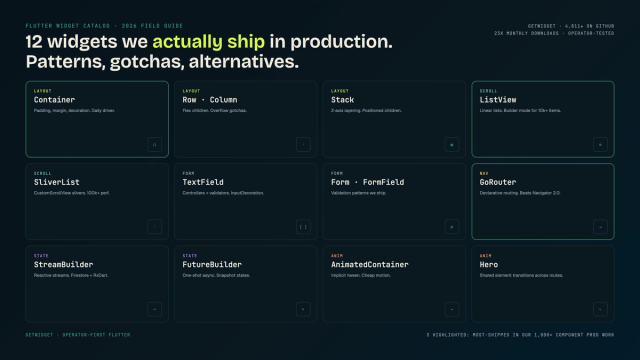
Flutter Widget Catalog: 12 We Ship in Production (2026 Field Guide)
The 10 must-have Flutter widgets every developer should know — containers, lists, buttons, navigation, gestures — what they do and when to use them.

Is Cursor AI Worth It? An Honest Review After 6 Months in Production
Six months of Cursor in production: 2026 update covering Composer 2, background agents, Hooks, MCP, the June 2025 pricing reset, real cursor vs Copilot team cost math, and where Continue.dev fits as the open-source alternative.