Is Cursor AI Worth It? An Honest Review After 6 Months in Production
Six months of Cursor in production: 2026 update covering Composer 2, background agents, Hooks, MCP, the June 2025 pricing reset, real cursor vs Copilot team cost math, and where Continue.dev fits as the open-source alternative.

Six months ago we put Cursor on every engineer's machine and told them to use it as their primary IDE for real client work. No prototyping sandbox, no toy repos. Production Flutter apps, Node.js backends, Astro sites. The question we wanted answered was simple: is Cursor AI worth it when you're shipping under deadlines, not just experimenting on weekends?
The short answer: yes, but with specific caveats that most reviews skip. This Cursor AI review covers what we actually measured, where Cursor wins cleanly, where it burns tokens without delivering, and how it stacks up against GitHub Copilot on the metrics that matter for a team paying per seat.
What Cursor actually is (and what makes it different)
Cursor is a VS Code fork with AI built into the editor at a deeper level than any extension can reach. It ships its own model layer, its own codebase-indexing system, and its own multi-file edit mode. The tab-completion you get from Copilot is there, but Cursor layers on top of that a full chat panel, inline diff editing, and an agent mode that can write, run, and fix code across multiple files in one shot.
The underlying models are third-party: Claude Sonnet, GPT-4o, and Cursor's own smaller tab-completion model run depending on which feature you're using. That model-agnostic architecture is both a strength (best model per task) and a weakness (your completions are only as good as whatever Cursor routes to, which can change without notice). We run the same Claude stack in client delivery; our Claude development practice ships agents and copilots model-agnostic but Claude-default.
Cursor AI pricing: what you actually pay
Cursor AI pricing has three tiers in 2026. Free gives you a Pro trial, then 2,000 tab completions a month and 50 slow premium requests. That ceiling cracks within a week of professional use. Pro at $20 a month gets unlimited tab completions plus $20 of usage-based credits at API rates on premium models. After Cursor's June 2025 pricing reset, those credits translate to roughly 225 premium requests a month on Claude or GPT-5, down from the previous 500-fast-request quota. Business at $40 per seat adds admin controls, SSO, and a privacy mode that keeps your code out of training pipelines.
Pro fits individual engineers; Business is mandatory for client work needing code confidentiality. The $20 credit ceiling is the spend trap. A single multi-file refactor can burn $1–3 in credits, and a heavy sprint pushes engineers past included usage by week three.
Where Cursor genuinely earns its keep
Multi-file refactors are where Cursor pulls ahead of every extension-based tool we've tried. Ask it to rename a class and update all call sites, or extract a service from a fat controller into its own file, and the diff it produces is accurate in a way that would take 20 minutes of grep-and-edit by hand. We've used this on Flutter widget trees with 15+ files that shared state through the same base class, and the refactor came back clean on the first try roughly 70% of the time.
The codebase-indexing context is the second genuine win. Copilot sees the open file plus a few neighbors. Cursor indexes your entire repo and pulls the right types, interfaces, and patterns into context when you ask a question. On a new engineer onboarding to an unfamiliar codebase, "how does authentication work in this app?" returns a useful, accurate answer from Cursor. The same question in Copilot's chat returns generic advice.
Tab completion quality is genuinely better than Copilot at the unit level. Our engineers report a ~65% accept rate after the first week, compared to roughly 45% on Copilot. That gap matters because every rejected completion breaks flow. The difference is most visible on boilerplate-heavy work: writing test cases, building out API handlers that mirror an existing pattern, or adding getters/setters to a data class.
The codebase indexing is what sold the team. Copilot knows the open file. Cursor knows the whole project. That distinction matters every time you ask 'how does this service connect to that one.'
Where Cursor breaks down in production
Agent mode and Composer were the most overhyped features through 2025, and Composer 2 has narrowed the gap without closing it. On isolated tasks with a clear spec, "add a search endpoint that takes a query param and returns paginated results from this table", Composer 2 produces usable output and Cursor's own benchmarks claim most agent turns finish in under 30 seconds, roughly 4× faster than peer frontier models. On tasks that require reading implicit conventions across the codebase, it still misses. We've had agent sessions churn through credits, rewrite three files, and leave the codebase in a worse state than where it started. The recursive blast-radius failure mode, fix, type error from fix, fix the fix — is rarer with Composer 2 but not gone.
Latency spikes are the second production friction point. During peak hours, the time from command to first output on a Composer task can stretch to 8-12 seconds. For quick edits that's tolerable. For a back-and-forth pairing session on a complex feature, the rhythm breaks down and engineers start switching to a terminal Claude Code session instead, which is faster on large context tasks.
The third issue is context window management on very large repos. Our mobile app codebase is ~120,000 lines across ~800 files. Cursor's indexer handles it, but the retrieved context for any given question is limited by the model's window. On questions that require synthesizing patterns from 20+ files simultaneously, the answer degrades. This is a fundamental model limit, not a Cursor limit, but it's worth knowing before you adopt it expecting unlimited contextual awareness.
Cursor vs Copilot: the comparison that actually matters
The cursor vs copilot question comes down to depth versus ubiquity. Copilot integrates with your existing VS Code setup, works in JetBrains IDEs, and costs half as much per seat. Cursor requires switching editors and costs $20/month versus $10/month for Copilot Individual. For a 10-engineer team, that's a $1,200/year delta before any overages.
Full repo indexing, multi-file Composer 2 agent, deeper tab completion context, inline diff editing, background agents for parallel work. Requires switching to Cursor's VS Code fork. $20/mo includes $20 of usage credits — roughly 225 premium requests at current rates.
Works in any IDE (VS Code, JetBrains, Neovim). Single-file context by default. Chat quality is improving but still weaker on cross-file reasoning. No agent mode with multi-file editing. Lower per-seat cost, predictable billing.
For engineers whose primary work is feature development on medium-to-large codebases, Cursor wins the cursor vs copilot comparison on output quality. For engineers who split time across multiple IDEs or whose work is mostly short scripts and SQL, Copilot's ubiquity advantage cancels out the completion quality gap.
One point the cursor vs copilot debate misses: Copilot is betting heavily on its GitHub integration. For teams that do code review in GitHub, Copilot's ability to review PRs, suggest CI fixes, and summarize changelogs inside GitHub's UI has no Cursor equivalent. If your workflow is tight with GitHub Actions and PR reviews, that integration layer adds value Cursor doesn't match.
Cursor vs Copilot pricing breakdown for a 10-engineer team
Most cursor ai pricing comparisons skip team math. At individual scale, Copilot at $10 vs Cursor Pro at $20 looks like a 2× delta. At team scale with overages, the picture shifts. A 10-engineer team on Cursor Pro with Composer 2 typically lands at $5,000–$11,000 a year. Copilot Business at $19/seat for the same team is a flat $2,280/year. The output-quality delta has to clear that $3,000–$9,000 gap to justify Cursor on economics alone.
| Plan | Subscription / yr | Typical overage / yr | Total / yr |
|---|---|---|---|
| Cursor Pro × 10 ($20/mo) | $2,400 | $2,400–$6,000 | $4,800–$8,400 |
| Cursor Business × 10 ($40/mo) | $4,800 | $1,800–$4,800 | $6,600–$9,600 |
| GitHub Copilot Business × 10 ($19/mo) | $2,280 | $0 | $2,280 |
| GitHub Copilot Enterprise × 10 ($39/mo) | $4,680 | $0 | $4,680 |
Cursor vs Windsurf vs Claude Code: where each fits
Our team runs Cursor, Claude Code, and occasionally Windsurf across different task types. Each tool has a distinct sweet spot on our actual workload, so we route by task type rather than mandate one.
| Task type | Cursor | Claude Code | Windsurf | Copilot | |
|---|---|---|---|---|---|
| Multi-file refactor | Strong — repo indexing helps | Strong — large context window | Comparable to Cursor | Weak — single-file default | |
| Tab completion, flow state | Best in class, ~65% accept | N/A — no tab completion | Good, slightly behind Cursor | Good, ~45% accept rate | |
| Large codebase context Q&A | Good — indexed retrieval | Best — 200K token window | Good | Weak | |
| Autonomous multi-step agent tasks | Capable but error-prone | Best control, lowest hallucination | Comparable to Cursor | Limited | |
| Monthly cost per engineer | $20 (+ overage risk) | $20 Claude Max or API cost | $15 | $10 | |
| IDE flexibility | VS Code fork only | Terminal / any editor | VS Code fork | All major IDEs |
Claude Code wins on tasks that require reading a 300-line spec and producing a coherent 5-file feature from scratch. The larger context window and lower hallucination rate on long, structured tasks make it better for that specific work. Cursor wins on the daily flow-state coding where tab completion and inline diff matter more than maximum context. When the spec is a multi-step agent rather than a feature, the orchestration patterns we use shift to Claude with LangGraph — covered in detail in our multi-agent architecture walkthrough.
If pricing or privacy rules Cursor out, Continue.dev is the alternative we point teams at most. Open source, runs in VS Code and JetBrains, supports any model backend including local Llama or DeepSeek. The agent will not match Composer 2 on multi-file refactors, but for engineers who want AI completion plus chat without the credit meter or cloud dependency, it is the cleanest substitute.
What changed in Cursor through 2026: Composer 2, background agents, Hooks, MCP
Composer 2 is Cursor's own frontier coding model, RL-trained for the multi-file agent loop. Most turns finish under 30 seconds versus the 8–12 second first-token-then-stall we used to hit. Quality on isolated tasks is closer to Claude Opus 4.7 than the gap once was.
Background agents (Feb 2026) clone your repo into a cloud VM, run on a dedicated branch, and land results as pull requests while you keep coding locally. You can fan up to 8 in parallel for boring high-volume work like dependency upgrades. The Feb upgrade gave each agent a full desktop with browser, so it can run the code, click through the UI, and screenshot its own verification before opening the PR. We still PR-review every diff.
Cursor Hooks wire scripts to editor events. The most useful, onPreEdit, runs before Composer applies changes and can veto an edit. We use it to block agent commits that touch a list of don't-auto-edit paths: database migrations, env configs, billing code. Cursor is also a native Model Context Protocol client, so any MCP server slots into the agent toolbox. For mature orgs, MCP is what turns Cursor from an IDE into a workflow surface.
Is Cursor AI worth it? Our honest verdict after 6 months
For engineers who spend the majority of their day in a single codebase doing feature development, Cursor AI is worth it at $20/month. The tab-completion quality improvement and the multi-file refactoring capability together add up to roughly 30-40 minutes of recovered time per day per engineer in our measurement. At $20/month, the payback threshold is about 15 minutes of saved time per month, which we hit in the first day.
Is Cursor AI worth it for every engineer? No. If you work primarily in JetBrains IDEs, split time across multiple environments, or mainly write scripts and data pipelines with shallow file-dependency graphs, Copilot's $10/month at your existing IDE is the better choice. The productivity gap closes when the task complexity drops.
The question "is Cursor AI worth it" also changes when you factor in Business tier requirements. At $40/seat with a 10-person team, you're at $4,800/year versus $1,200/year for Copilot Business. That gap requires a clear, measurable productivity argument to justify to a CFO. We have that argument for our production engineering team, but not for every role.
How to get Cursor's accept rate above 60% faster
Three things moved the needle fastest for our team. First, add a .cursorrules file to the repo root that documents your stack's conventions: naming patterns, preferred libraries, which patterns are deprecated. Cursor reads this on every session and surfaces it in context. The completions get noticeably more accurate to your actual codebase within two days.
Second, keep your agent tasks small. The sweet spot is "do one thing to this module" rather than "build the entire feature." Agent mode's error rate climbs steeply with task scope. A sequence of five small agent tasks produces better results than one large one, and you catch problems earlier. That climb is exactly what a trajectory-scoring rubric catches before production; our AI agent reliability evaluation rubric is how we set the small-task floor on internal agent work.
Third, use the Chat panel with @codebase context for architecture questions and the Composer for edits. Mixing the two, asking an edit question in Chat — produces slower, less accurate results than using each for its intended purpose.
Our team's take on Cursor integrates into a broader set of Flutter development best practices we've locked in for production delivery — how we handle state, testing, and review gates hasn't changed just because AI tooling handles more of the boilerplate.
For backend engineers evaluating whether AI tooling changes how they structure Node.js services, the architectural patterns in our guide to production Node.js app patterns still apply — Cursor helps you write the service faster, but the decisions about separation of concerns and error boundary design stay human-owned.
FAQs
Is Cursor AI worth it compared to GitHub Copilot?
For engineers in a single large codebase doing feature development, yes. Cursor's repo indexing and multi-file editing produce meaningfully better results than Copilot on complex tasks. For engineers who split time across multiple IDEs or work on shorter, simpler scripts, Copilot's $10/month and IDE flexibility make it the better value. The gap narrows as task complexity drops.
What is Cursor AI pricing in 2026?
Cursor AI pricing has three tiers: Free (2,000 completions/month, 50 slow model requests), Pro at $20/month (unlimited tab completions, 500 fast premium requests, 10 agent tasks/day), and Business at $40/seat/month (adds SSO, admin controls, privacy mode). Usage-based overage applies when you exceed the monthly request limits on Pro and Business.
How does Cursor compare to Windsurf?
Cursor and Windsurf are both VS Code forks with similar feature sets: repo indexing, multi-file agent mode, inline editing. Windsurf's Cascade agent is generally considered comparable to Cursor's Composer. Cursor has a larger user base and more community extensions. The practical difference for most teams is small — try both on a real project for a week before committing a team license.
Is Cursor AI worth it for a cursor ai alternative if I'm already on Claude Code?
They serve different use patterns. Claude Code runs in the terminal and excels at large-context tasks, greenfield feature generation, and agentic workflows where you want maximum control. Cursor excels at in-editor flow-state work: tab completion, inline diffs, and quick multi-file edits without leaving the editor. We run both. Engineers who primarily code in the editor use Cursor; engineers doing architecture and complex task automation use Claude Code.
Does Cursor send my code to third-party servers?
On the free and Pro plans, Cursor may use code context to improve its models. The Business plan includes a privacy mode that prevents your code from being used for training. If you're working on client code with NDA obligations, you need the Business plan with privacy mode enabled, or you should evaluate whether any cloud-based AI coding tool is appropriate for your confidentiality requirements.


The Best AI Chatbots in 2026: A Practitioner Comparison
Top AI chatbots in 2026 compared by workload. Coding, research, writing, long-context, multimodal, cost — practitioner picks with current benchmarks.

LLM Development Services: 11 Companies Scored on Eval, Pricing + Audit (2026)
A rubric-driven look at LLM development vendors. Eval methodology, deployment patterns, pricing transparency, and how to score them on the same criteria.

AI Integration for Business: Where It Pays Off (and Where It Doesn't)
AI integration for business in 2026: where it pays off, where it fails, and the IBM/Deloitte numbers behind the gap. Five real integration patterns with 569Xlvalue, plus the five things the 5% of pilots that ship have in common.
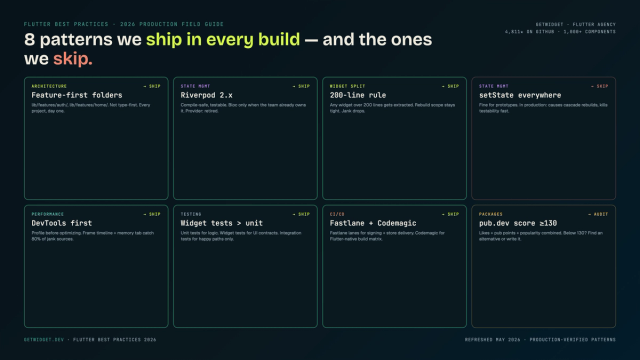
Flutter Mobile App Development: A 2026 Production Field Guide
How we structure Flutter projects at GetWidget in 2026: feature-first layout, Riverpod defaults, Dart 3 records and sealed classes, Material 3 theming, the 200-line widget rule, performance diagnosis, CI/CD pipelines, and the production pitfalls that bite teams after launch.